
Updated 30 September 2026: Anthropic released Claude Sonnet 5.5 on 28 September, replacing Sonnet 5, so we have updated the Claude Code model details; Cursor’s model list is still as we read it on 28 September. Our verdict is unchanged.
Cursor and Claude Code end up on the same shortlist for most developers, yet they come at the job from opposite ends. Cursor is an editor with agents built into it. Claude Code is an agent you point at whatever you already use: a terminal, VS Code, a browser tab, even a Slack channel. We went through both vendors’ pricing pages and documentation on 28 September 2026 to compare how each one works, which models you get, what the plans cost and where the bill starts to climb.
- Both start at $20 a month, and both let you carry on past the included usage at API rates. Cursor Pro is $20. Claude Pro is $20 a month, or $17 if you pay annually, and Claude Code comes with it.
- Pick Cursor if you want to choose your model. It runs Claude Opus 5.5, Sonnet 5 and Fable 5.1 next to OpenAI’s GPT-5.6 family, Gemini 3.1 Pro, Grok 4.7 and Cursor’s own Composer 2.5. Claude Code runs Claude and nothing else.
- Pick Claude Code if you live in the terminal or leave agents running for hours. You get subagents, more than 30 hook events, MCP, scheduled routines and a VS Code extension that installs into Cursor too.
- The model sets the bill, whichever tool you use. Claude Opus 5.5 costs $4 in and $20 out per million tokens inside Cursor and through Claude Code on the API alike. Cursor’s Teams plan adds $0.25 per million tokens on third-party models.
The two products in September 2026
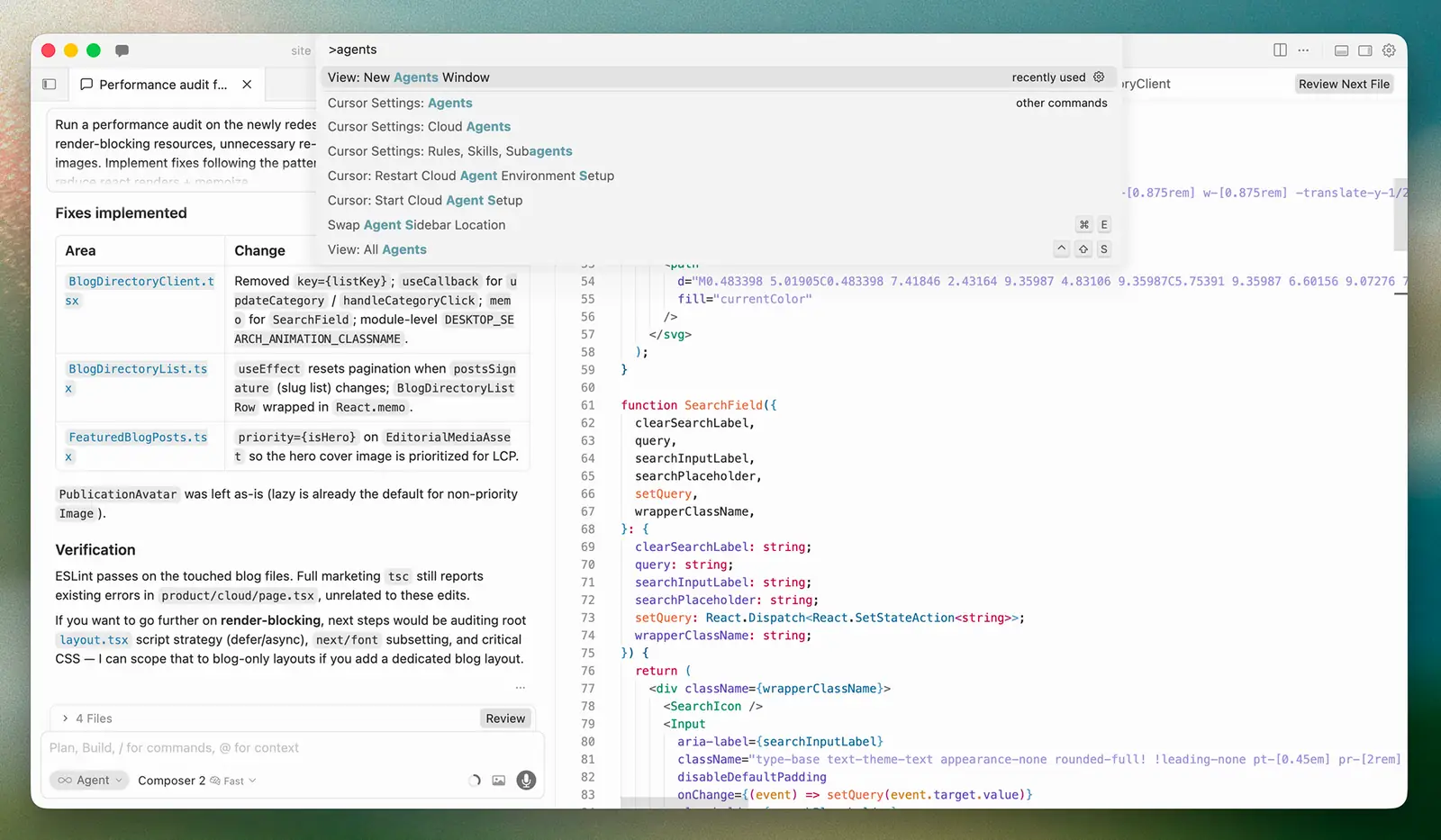
Cursor comes from Anysphere, which is now part of SpaceX, and its cloud also runs xAI’s Grok Bot agents. It’s a desktop editor built on the VS Code codebase, with an agent in the sidebar, an Agents Window for running several agents at once, Cloud Agents that work on Anysphere’s virtual machines, a CLI, a mobile app and Bugbot for reviewing pull requests. In September 2026 it added Projects, where a coordinator agent hands work to subagents in parallel, plus Rollouts and Security Review for Teams and Enterprise customers. If you’d rather stay in plain VS Code, our guide to GitHub Copilot covers setup and what the Free plan includes.
Claude Code comes from Anthropic, and its own page calls it an “AI Coding Agent, Terminal, IDE”. At the centre is a command-line program that “runs locally in your terminal and talks directly to model APIs”, with no backend server and no remote code index. Around it Anthropic has added a VS Code extension, a JetBrains plugin, a desktop app, a web version at claude.ai/code, iOS and Android apps, a Slack integration and GitHub Actions. On 29 October 2026, Cursor’s own marketplace served a tampered copy of the Claude Code extension for about 11 hours. The current release as we write is 2.1.283, dated 25 September 2026.
| Plan | Price (US$) | What it includes | Models | Past the limit |
|---|---|---|---|---|
 Cursor Hobbycursor.com/pricing | Free | “Limited Agent requests”, access to Composer | Composer only | Upgrade |
| Cursor ProPro Plus $60 · Ultra $200 | $20 / month | Extended Agent limits, frontier models, MCPs, skills, hooks, Cloud Agents, Bugbot on usage billing | Multi-vendor | On-demand at API rates |
| Cursor TeamsStandard · Premium | $40 or $120 / user / month | Team billing, shared marketplace, Bugbot reviews, analytics, team-wide privacy mode, SSO | Multi-vendor | On-demand, plus $0.25 / M tokens on third-party models |
 Claude Proclaude.com/pricing | $20 / month ($17 annual) | Claude Code plus Claude apps; “at least 5x more usage per 5-hour session than Free” | Claude only | Usage credits at API rates |
| Claude Max5x or 20x Pro | From $100 / month | Claude Code plus Claude apps; Fable at 50 % of weekly limits | Claude only | Usage credits at API rates |
| Claude TeamStandard · Premium, annual | $20 or $100 / seat / month | Claude Code and Cowork, admin console, SSO; Premium seats get 5x Standard usage | Claude only | Usage credits with admin spend limits |
Read the price column carefully, because the two companies count usage differently. Cursor gives each plan two pools that reset monthly: a “Cursor Models” pool covering Grok 4.7, Grok 4.6, Grok 4.5 and Composer 2.5, and an “Other Models” pool for everything else at the model’s API price. Anthropic gives each plan an allowance that resets on a rolling five-hour window and a weekly window, and it’s shared between the Claude apps and Claude Code. Neither company publishes a fixed request count.
How each one feels to work in
In Cursor the agent sits in a panel next to your code. You press Cmd+I, describe the job, and watch it search files, run shell commands, take browser screenshots and edit in place. Tab completion is always on, and paid plans give you unlimited completions. The docs describe checkpoints that snapshot your files before a big change, queued messages you can line up while the agent is busy, and a /side command for tangents. When one agent isn’t enough, the Agents Window lets you “run agents in isolated Git checkouts so each task has its own files and changes”, and you can “move an agent from cloud to local to iterate quickly, and move it back to the cloud so it keeps working on its own”.
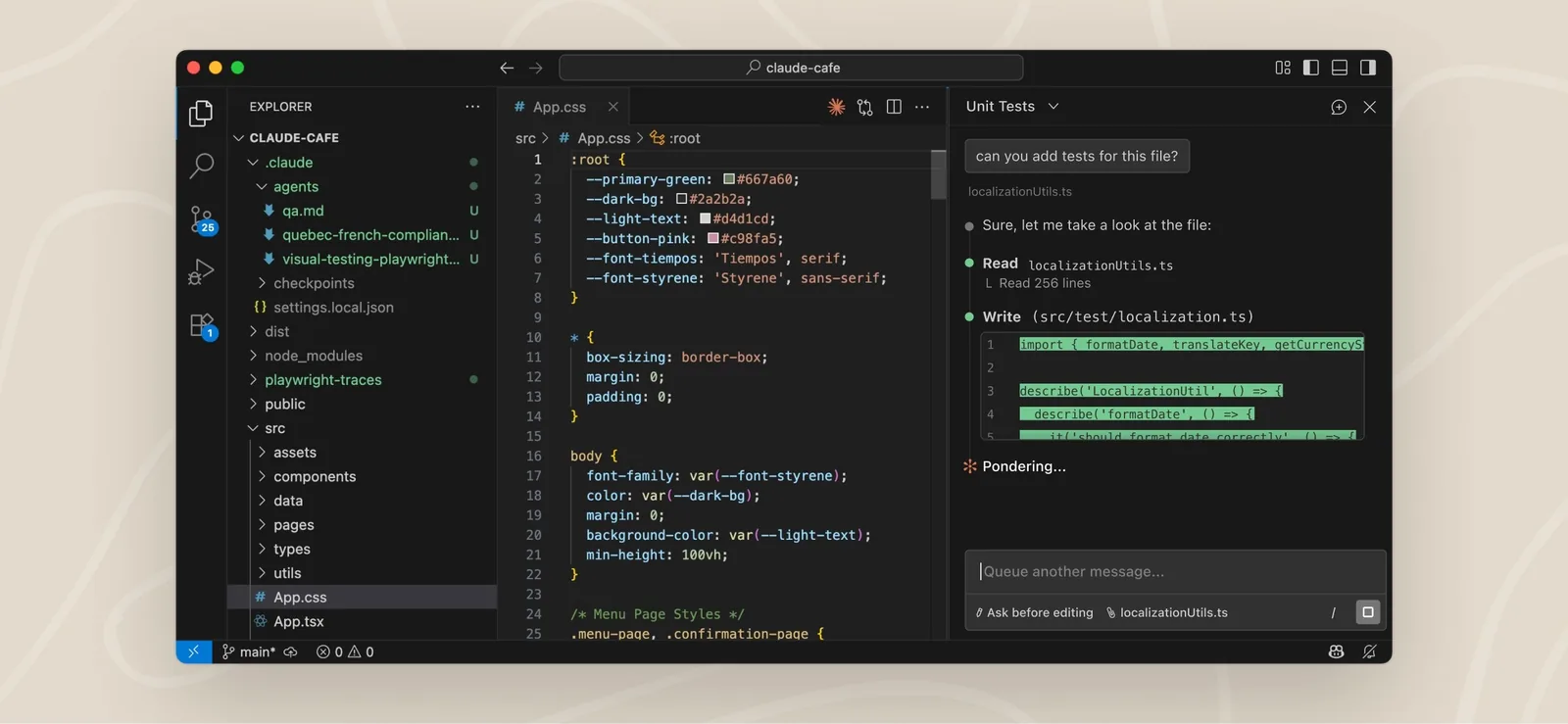
Claude Code starts from the other end. The default is a terminal session in your project directory, and Anthropic’s own examples are pure Unix: pipe a log into claude -p, run it in CI, chain it with git. The IDE extensions put “inline diffs, @-mentions, plan review, and conversation history” on top of the same engine, and every surface reads the same CLAUDE.md files, settings and MCP servers. Spend a day with each and you notice where your eyes go. In Cursor you watch the code while the agent works. In Claude Code you watch the agent, then read the diff when it’s done.
curl https://cursor.com/install -fsS | bash, with Agent, Plan and Ask modes and a non-interactive mode for scripts, so the terminal isn’t Claude Code’s territory alone any more.Which models you get
This is the clearest difference between them. Cursor’s models page lists Claude Opus 5.5, Claude Sonnet 5 and Claude Fable 5.1 from Anthropic, GPT-5.6 Sol, Terra and Luna from OpenAI, Gemini 3.1 Pro and Gemini 3.8 Flash from Google, Muse Spark 1.3 from Meta, Grok 4.7 and Cursor’s own Composer 2.5, plus a long tail of older versions. An “Auto” setting sends each request through Cursor Router in one of three modes (Cost, Balance or Intelligence), and “all Auto modes bill at the list price of the model each request is routed to”. That list is as we read it on 28 September, the day Anthropic released Claude Sonnet 5.5, so check Cursor’s models page for the newer Sonnet.
Claude Code runs Claude, full stop. The default on Pro, Max, Team, Enterprise and the Anthropic API is Opus 5.5. The aliases opus, sonnet, haiku and fable switch families through /model, and opusplan uses Opus to plan and Sonnet to execute. An effort dial from low to max, plus an “ultracode” setting that orchestrates dynamic workflows, sets how hard the model thinks. Enterprises can route the same tool through Amazon Bedrock, Google Cloud’s Agent Platform or Microsoft Foundry, but it’s still Claude at the other end.
One point matters for your wallet. For Claude models, Cursor’s per-token prices are the same as Anthropic’s own: Opus 5.5 at $4 in and $20 out with $0.20 cache reads, Sonnet 5 at $2 and $10, Fable 5.1 at $10 and $50. Cursor isn’t marking Claude up on individual plans, so the model you pick, and how many tokens it burns, decides the bill in both tools. Where Cursor does come out cheaper is its own pool. Composer 2.5 is listed at $0.50 in and $2.50 out, Grok 4.7 at $2 and $6, and both get “significantly more included usage” than the third-party pool.
How the included usage runs out
Cursor’s docs are unusually frank about what people spend. “Daily Tab users” and “limited Agent users” typically stay inside the included usage. “Daily Agent users” are put at “typically $60–$100/mo total usage”, and “power users (multiple agents/automation)” at “often $200+/mo”. Once the pool is empty, you either move up to Pro Plus at $60 or Ultra at $200, or turn on on-demand usage, which is “billed monthly at the same rates” and, in Cursor’s words, “never downgraded in quality or speed”. Cloud Agents and Bugbot draw from the same usage, and Cursor makes you set a spend limit before your first cloud agent runs.
Anthropic sells Claude Code two ways. On a subscription it draws from the same allowance as the Claude apps, with Pro giving “at least 5x more usage per 5-hour session than Free” and Max “5x or 20x more usage per 5-hour session than Pro”. When you hit the limit, you wait for the window to reset, upgrade, or turn on usage credits at standard API rates. On the API, through the Claude Console or a cloud provider, you just pay per token. Anthropic’s costs page puts the enterprise average at “around $13 per developer per active day and $150-250 per developer per month, with costs remaining below $30 per active day for 90% of users”.
/clear between unrelated tasks, keep CLAUDE.md under 200 lines and hand verbose work to subagents. Cursor says much the same in its own words: your model choice “affects how quickly your included usage is consumed”. Set a spend limit in both before you leave an agent running overnight.Hooks, subagents, MCP and cloud agents
By September 2026 the two feature lists look much alike on paper, so what separates them is how far each feature goes. Both support MCP servers, project rules, skills, plugins, hooks and subagents. Both run agents in the cloud. Cursor’s Cloud Agents start from the web, Slack, GitHub, Linear, the iOS app or an API call and “produce merge-ready PRs with artifacts to demo their changes”. Claude Code’s web and mobile sessions do the same from claude.ai/code, and claude --teleport pulls a cloud session back into your terminal.
Claude Code goes further on automation. Its hooks cover more than 30 lifecycle events, from PreToolUse and PostToolUse to SubagentStop, PreCompact and ConfigChange, and a hook can be a shell command, an HTTP endpoint, an MCP tool, a single-turn prompt or a whole subagent. Subagents are Markdown files in .claude/agents/ with their own tools, model, permission mode and effort, and three come built in: Explore, Plan and General-purpose. Routines run in Anthropic’s cloud on a schedule or on GitHub events, and the Agent SDK exposes the whole harness as a library. Cursor’s hooks are a shorter list in .cursor/hooks.json, including preToolUse, beforeShellExecution, beforeMCPExecution and afterFileEdit, with command and prompt types. Its subagents run through the Task tool and, since 10 September, are coordinated by Projects. We compare those hooks and subagents with OpenAI’s agent in Codex vs Claude Code.
Cursor has the better review loop. Bugbot comments on every pull request, Security Review hunts for exploitable vulnerabilities before merge, and Rollouts “watches every change as it deploys and reports its health per environment”. Claude Code has GitHub Code Review and a /security-review command, but where Anthropic has a command, Cursor has built a whole product line around the PR.
+Reasons to pick Cursor
- You want to switch between Claude, GPT-5.6, Gemini and Grok per task
- You work visually: Tab completion, inline edits, agents beside the code
- A cheap first-party pool: Composer 2.5 at $0.50 / $2.50 per million tokens
- Bugbot, Security Review and Rollouts cover the pull request end to end
+Reasons to pick Claude Code
- You live in the terminal, CI or scripts and want an agent that pipes
- The deeper hooks and subagent system of the two; Routines and an SDK
- Runs in VS Code, JetBrains, Cursor, a browser, Slack and on your phone
- One subscription covers the Claude apps and the coding agent
Privacy, training and team controls
Cursor’s Privacy Mode is open to every user, free or paid, and with it on “we will not train on your data”. Cursor says it holds zero-data-retention agreements with its model providers, and team admins can enforce the setting so new members inherit it. With Privacy Mode off, the privacy overview says Cursor “may use and store codebase data, prompts, editor actions, code snippets” to improve its features and train its models, so find that switch on day one. Cursor holds SOC 2 Type II, ISO 27001:2022 and ISO 42001:2023 attestations, and Enterprise adds SSO, SCIM, audit logs, MDM deployment, CMEK and regional data residency for a 10 percent uplift on the price.
Anthropic draws the line by contract instead. On Free, Pro and Max you decide in your account settings whether your data, Claude Code sessions included, can be used to train future models; retention is 30 days if you say no and five years if you say yes. On Team, Enterprise, the API and the cloud providers, Anthropic “does not train generative models using code or prompts sent to Claude Code”, retention is 30 days as standard, and Enterprise organisations can turn on zero data retention. Telemetry “never include[s] your code, prompts, or file paths” and is off by default on Bedrock, Google Cloud and Foundry. Admins can push managed settings that local configuration can’t override, and they get a usage dashboard and, on Enterprise, an analytics API.
As for what the agent itself is allowed to do, both ask first by default. Claude Code in Manual mode “starts with read-only permissions” and asks before edits and commands, with an optional sandbox for filesystem and network isolation and an auto mode in which a classifier reviews actions on your behalf. Cursor asks for approval on terminal commands unless you configure Run Modes, and admits its auto-review classifier is “best-effort guardrails rather than a hard security boundary”. Both companies are telling you the same thing: read the diff.
Which subscription makes sense
If you spend the day in an editor and like being able to try a different model when one gets stuck, pay for Cursor Pro at $20 and switch Privacy Mode on. If you spend the day in a terminal, run agents for hours, or want one subscription that also covers the Claude apps, pay for Claude Pro at $17 to $20 and only move to Max when the five-hour window keeps closing on you. Teams that need a written no-training guarantee get one on either Cursor Teams at $40 a seat or Claude Team at $20 a seat, and should compare the token surcharge and the admin tooling rather than the headline price.
For a lot of developers the sensible answer is both: Cursor as the editor and Claude Code as the agent inside it. That comes to $37 to $40 a month before usage, and it’s the setup Anthropic’s own docs quietly endorse with an “Install for Cursor” button.
Frequently asked questions
Is Claude Code better than Cursor?
Not across the board; they’re built for different ways of working. Claude Code is a terminal-first agent with the deeper automation system: 30-plus hook events, configurable subagents, scheduled routines and an SDK. Cursor is an editor with agents built in, a choice of models from several vendors and a stronger set of pull request review tools. Choose by where you spend your day.
Can I use Claude Code inside Cursor?
Yes. Anthropic’s VS Code extension has an “Install for Cursor” link and behaves in Cursor as it does in VS Code, with inline diffs, plan review and several conversations at once. You’ll need a Claude Pro, Max, Team or Enterprise subscription or a Claude Console account.
Which is cheaper, Cursor or Claude Code?
At the entry level both cost $20 a month, or $17 for Claude Pro paid annually. After that the model decides. Claude Opus 5.5 is $4 in and $20 out per million tokens in both. Cursor’s own Composer 2.5 is much cheaper at $0.50 and $2.50, and Cursor reckons daily agent users spend $60 to $100 a month in total; Anthropic’s API average is $150 to $250 a month per developer.
Does Cursor use my code to train its models?
Only if Privacy Mode is off. With it on, Cursor says it “will not train on your data” and that its model providers are under zero-data-retention agreements. Any user can switch it on, and Teams and Enterprise admins can enforce it for the whole team.
Which models can Claude Code use?
Claude models only: Opus 5.5 by default, with Sonnet 5.5, Haiku 5.5 and Fable 5.1 a /model away, on the Anthropic API or through Amazon Bedrock, Google Cloud’s Agent Platform and Microsoft Foundry. If you want GPT, Gemini or Grok in the same tool, you want Cursor.
Sources and method
We took plans, prices, model lists, per-token rates, feature names and privacy statements from Cursor’s and Anthropic’s own pricing pages and documentation on 28 September 2026; Anthropic’s model pages were rechecked on 30 September 2026 after the Claude Sonnet 5.5 release. We rechecked the current Claude models on 28 October 2026. The spending estimates are the vendors’ published figures, not our measurements, and we haven’t run a timed head-to-head for this guide. Quotations are verbatim from the pages listed.
- Cursor, Pricing: Hobby, Individual (Pro, Pro Plus, Ultra), Teams and Enterprise plan contents and prices
- Cursor Docs, Models & Pricing: usage pools, per-model token prices, usage guidance, on-demand billing, Cursor Token Rate, Auto modes, Max Mode
- Cursor Docs, Models: full model list by provider
- Cursor Docs, Agent overview and Agents Window: agent tools, checkpoints, worktrees, cloud-to-local handoff
- Cursor Docs, Cloud Agents, CLI, Hooks and Bugbot
- Cursor, Changelog: Projects (10 Sep 2026), Rollouts and Security Review (23 Sep 2026), Self-hosted Machines (2 Sep 2026)
- Cursor, Security, Privacy overview and Agent security: Privacy Mode, certifications, enterprise controls, run modes
- Anthropic, Claude Code: product description, surfaces, local execution claim, plan inclusion, fast mode price
- Claude, Plans and pricing: Free, Pro, Max, Team and Enterprise prices and usage multipliers
- Claude Code Docs, Overview, VS Code, Model configuration, Subagents, Hooks and MCP
- Claude Code Docs, Manage costs: per-developer averages, usage windows, usage credits, context advice
- Claude Code Docs, Data usage, Security and Enterprise deployment
- Claude Code Docs, Changelog: version 2.1.283, 25 September 2026
- Anthropic, API pricing: Opus 5.5, Sonnet 5, Haiku 4.5 and Fable 5.1 per-token rates
- Anthropic, Introducing Claude Sonnet 5.5: release date, API price, Claude Code effort default
- Anthropic, Models overview: current Claude models; Sonnet 5 no longer listed as current