
DeepSeek’s Harness team has open-sourced dsh-superagent-prototype, a coding agent that sits next to one GitHub repository, picks up requests from people you have allowed, and answers with a pull request in the same conversation. It is a research prototype, not a DeepSeek product, and it is released under the MIT licence. It doesn’t run on its own: it is a plugin bundle for DeepSeek Harness, the company’s open-source agent app, and it uses whatever model you have connected there. The code appeared on GitHub on 31 October 2026, and the design article behind it followed on 1 November. On 3 November 2026 we cloned the repository and read the code, the setup guide and all nine design documents, and we read DeepSeek’s article too. We didn’t install or run the agent, so everything below is what the code and the documentation say.
- It works from GitHub, not from your editor. You mention the agent’s account in an issue or comment, it opens a ticket, works in its own session and directory, and replies with a pull request.
- It’s a prototype by DeepSeek’s own description. The README calls it “research prototype for reference only, not an official DeepSeek product” and says coding agents did much of the engineering.
- It does nothing proactive out of the box. The default accept mode is
observe, and with an empty allowed list no request can become a ticket. - Its worker sessions run with full access. The code sets DeepSeek Harness’s
danger-full-accesspreset, so commands run without approval as your OS user. The docs recommend a dedicated OS account. - The design article is bigger than the code. Cloud execution, a separate watchdog and other ideas from the article aren’t in this repository.
What is DeepSeek’s Super-agent prototype?
The README describes dsh-superagent as “a proactive coding agent for one GitHub repository, packaged as a bundle for DeepSeek Harness”. It listens to GitHub and, if you want, to Feishu, the workplace chat app known internationally as Lark. When someone on its allowed list asks for work, it opens a work item, does the work in a session and directory of its own, and answers in the original thread. A local web panel shows only what needs a person.
That is a different model from the coding agents most people know. Tools like Codex or Claude Code, which we compare in Codex vs Claude Code, wait for you in a terminal or an editor, and you watch each session. DeepSeek’s prototype is meant to sit beside a repository all day, receive requests where the team already talks, and only come back when there is a result, a question or a failure. The project’s own motto is “take as little human attention as possible, and give as much value as possible.”
The name in the title of the repository is “prototype”, and the README means it. It says the code was “adapted for publication”, that it is not identical to DeepSeek’s internal version, and that some designs from the article “are directions for future development and are not implemented in this prototype”. GitHub doesn’t show it as a release either: the history is a single commit, “feat: add the dsh-superagent research prototype”, and the issues tab is switched off.
How it works, from a mention to a pull request
The documentation uses a small set of terms, and the code sticks to them. In plain words, this is the path a request takes:
| Term in the docs | What it means in practice |
|---|---|
| Source | Where events come from: GitHub notifications for the agent’s account, or Feishu chats |
| Trigger and Thread | One event, such as a comment, and the conversation it belongs to, such as an issue or a pull request |
| Eval | The decision on whether a message asks for new work. Code checks who sent it first, then a model judges the rest |
| Mandate | What an accepted request allows: the rules it matched, how strong the request was and the policy version at the time |
| Ticket | One unit of authorised work. Only Eval can create one |
| Executor | A separate DeepSeek Harness session named worker-<ticket id> and a directory of its own for each ticket |
| Subscription | Later messages on the same issue or pull request go straight to the ticket’s worker, without a new Eval |
Requests come in two strengths. A person on the allowed list who mentions the agent makes an explicit request, which works in every mode. Everything else is at most an inferred candidate: a message that doesn’t address the agent, or a message from a bot such as dependabot[bot], if you have put that bot on the source’s bot list. Other bots aren’t admitted at all. Inferred candidates only turn into work in the auto accept mode, and only when they match a rule the team wrote.
To try it, the deployment guide says to post a comment containing @<agent login> <request> from an allowed account. GitHub is polled once a minute by default, so a ticket should appear in the panel within about a minute.
What we found in the code
We cloned the repository into an empty folder on 3 November 2026, read the files and counted them. We didn’t install the dependencies, build it or run it. These are the specifics that most news coverage of the launch left out.
Size, languages and folders
- 216 files, about 3 MB. GitHub counts the code as 97.5% TypeScript, 1.9% CSS and 0.6% Python.
- About 15,200 lines of application code in
src, of which about 4,400 lines are the web panel insrc/client. The rest is split intocore,app,sources(GitHub and Feishu),executorandinfra. - About 15,000 lines of tests in 59 test files, almost as much as the code itself.
- The only Python is
scripts/dsh-superagent, a 250-line script that starts, stops and checks the service in a tmux session. - Nine numbered design documents in
docs, about 28,300 words in total. The architecture document alone runs to about 10,400 words. - About 8,300 words of prompts and skills in
promptsandskills: instructions for the router, the workers and team rules on scope, communication and delivery. - Earlier names. A comment in
src/infra/environment.tslists files “written under the project’s earlier names (dsh-tag,dsh-go,dsh-freelancer)”, which the agent still cleans up.
What SETUP.md asks your coding agent to do
The README doesn’t give you install commands. It tells you to ask your own coding agent to “Read SETUP.md in this repository and set up dsh-superagent with me.” SETUP.md is written for that agent, not for you, and it is strict about attention. The agent must ask one question per message, keep each message under 300 words, offer a recommended answer you can accept with one word, never ask for a secret in the chat, and not execute anything until you have confirmed the full plan.
Before the first question, it runs a probe on your machine: the versions of Node.js, pnpm, git, tmux, Python, the GitHub CLI and DeepSeek Harness, your GitHub login, whether lark-cli is installed, and whether an earlier setup exists. Then it asks up to nine questions, in this order: GitHub only or also Feishu, which repository, which GitHub account the agent acts as (it recommends a dedicated account, “never the operator’s own”), which chats, who may ask for work (your own login only), who may ask in Feishu, which local clone to use, who the commits should name as author, and whether to allow auto-merge (recommended: no).
After you confirm, the agent installs and configures everything, saves the settings through the panel’s local API and sets up an hourly health check from your normal DeepSeek Harness profile. You do the steps that need your hands: creating the agent’s GitHub account, accepting the repository invitation and signing the CLIs in. In other words, your coding agent ends up running installation commands on your machine. Read SETUP.md yourself before you hand it over.
The defaults, as set in the code
| Setting | Default | Allowed range or options | Where we found it |
|---|---|---|---|
| Accept mode | observe | off, observe, auto | src/policy.ts |
| Allowed list per source | Empty | GitHub logins or Feishu users | src/policy.ts, docs 006 |
| Unlisted person who mentions the agent | Ignored | explicit, inferred, ignore | docs 002 |
| Proactive rules | Two examples: “Copy fixes” and “Visual fixes” | Editable, up to 2,000 characters each | src/policy.ts |
| Time for one Eval decision | 120 seconds | 30–600 | src/policy.ts, src/limits.ts |
| Parallel workers | 3 | 1–16 | src/policy.ts, src/limits.ts |
| Blocked commands | None | Any command except gh, git and lark-cli | src/policy.ts, src/infra/environment.ts |
| GitHub polling | 60 seconds | 60–3,600 | src/sources/github.ts |
| Watching every new issue, pull request, comment and CI run | Off | Four separate switches | src/sources/github.ts |
| Background work after each turn | 30 minutes | Fixed | src/executor/dsh.ts |
| Preparing a ticket directory | 10 minutes | Fixed | src/executor/dsh.ts |
| Panel | Port 3082 on 127.0.0.1 | Port set in the profile | SETUP.md, src/app/http.ts |
Two details in that table are easy to misread. The 30-minute limit applies to background work after each turn, not to the whole ticket: at the limit, shell jobs are killed and the ticket is reported as waiting. Shell jobs left running after the agent hands over to a person, such as a preview server, are exempt. And in observe mode, a proactive candidate that the model likes is only recorded as “would accept”, so you can review what the agent would have done before you switch to auto.
The default team prompts set some house rules too. A pull request that changes the user interface must carry labelled before-and-after screenshots. Auto-merge is never switched on as the agent’s own account, and the default instructions allow it only when the change is under 200 added plus deleted lines and the required approvals cover the latest commit. The agent also credits human reviewers by adding Co-authored-by lines to the commits on its branch.
What “run commands without approval” means
The execution document says it plainly: “Executor Sessions run commands without approval as the operator’s OS user.” In the code, that comes down to one line. Every time the agent creates or resumes a session, for the router as well as for each worker, it sets DeepSeek Harness’s most permissive preset:
// src/app/sessions.ts, in ensure()
ctx.permissionPresets.set(result.agent.session, 'danger-full-access')
So there is no approval prompt for shell commands. A foreground command that takes longer than 5 seconds is moved to a background job, so the worker can keep reading new messages. The deployment guide spells out the consequence: “A worker can execute programs by path and read the operator’s home directory.”
What the code does add are guardrails around accounts. Setup writes command shims that come first on the PATH, so gh runs the agent account’s CLI and any blocked command fails. It writes a separate git configuration that replaces your global one, uses the agent’s CLI for GitHub credentials and removes GH_TOKEN and GITHUB_TOKEN. The subprocess service that setup and worker shells run through drops environment variables whose names contain KEY, PASSWORD, SECRET or TOKEN. The panel’s API only answers requests addressed to 127.0.0.1 or localhost with a special header. The comment at the top of environment.ts is clear about the limits: these are “default-path guardrails rather than an OS-level security boundary”. The docs’ recommendation is a dedicated OS account that holds only the agent’s credentials, and that is the setup we would use.
The licence
The LICENSE file is the standard MIT text, “Copyright (c) 2026 DeepSeek Harness Team”, and package.json says MIT as well. You can use, change and redistribute the code, including commercially, as long as you keep the copyright notice. DeepSeek Harness itself is also MIT-licensed, according to its GitHub repository. The licence covers the code only: model usage through your provider is billed separately, on that provider’s terms.
The design article, and what the prototype leaves out
The README points to an article called “Exploring Super-agent Design: Towards a More Autonomous Agent System”. The DeepSeek Harness account published it as an X article on 1 November 2026. It notes that the original is in Chinese and the English version is a machine translation, and it says Yujia Qiao implemented the system and wrote the article, based on shared work by the Harness team. Its core argument: “a single task is limited by model capability, but multi-tasking is limited by human attention.” In DeepSeek’s experience, a person can usually follow only three to five active sessions at once.
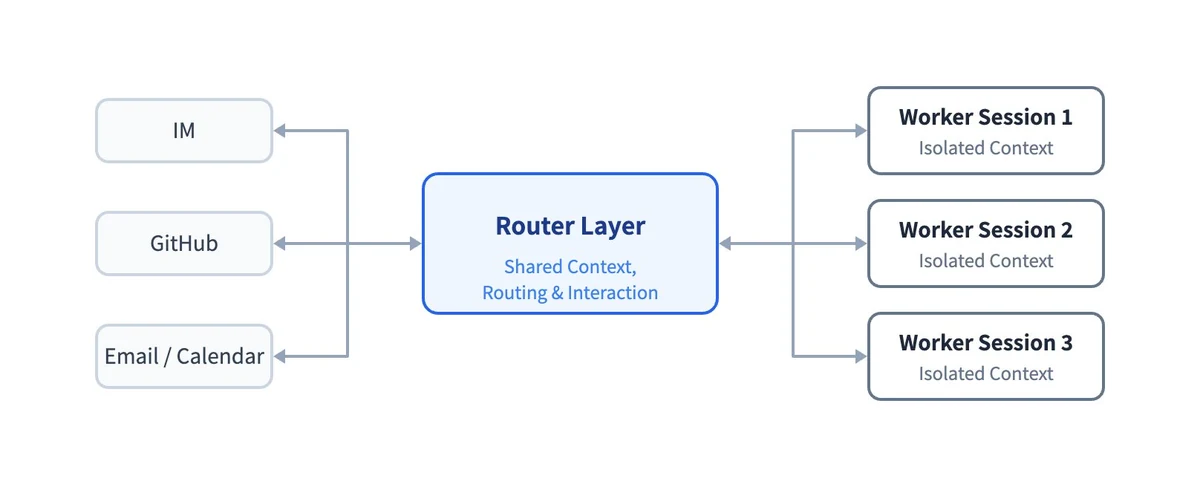
The answer it proposes is a two-level system. A long-lived router talks to people and hands out work, without running tasks itself. Isolated worker sessions each do one task. The article says the router’s job is often simple enough for a lighter model, while workers “usually need the most capable models”. The prototype follows that split, with separate model settings for evaluating requests and for executing them.
DeepSeek also published early numbers, which it labels “indicative only” because they come from synthetic workloads. In its test, about 300 chat and CI messages, roughly 20 of them real work requests, were sent to four designs, five runs each, with the coding itself simulated by a tool that only waits. The two-level design finished tasks in 12.4 minutes at the median and 15.7 minutes at the 95th percentile. A single session with a neutral prompt never delegated to a subagent and reached 29.5 minutes at the 95th percentile. These are DeepSeek’s own figures, and we haven’t reproduced them.
We compared the article’s sections with the repository’s documentation and code:
| Idea in the article | In the published prototype? | What we found |
|---|---|---|
| Router plus isolated workers | Yes | A main session (orchestrator) and one worker session per ticket |
| Two-stage filtering: code first, model second | Yes | A deterministic gate, then a model assessment |
| Follow-ups go straight to the worker | Yes | Subscriptions deliver later messages without a new Eval |
| Batching events that pile up at the router | Yes | Triggers that arrive during an Eval are merged into the next batch |
| Long commands that don’t block the agent | Yes | Foreground commands move to the background after 5 seconds |
| Acting ahead on signals nobody addressed to it | Limited | Rule-based proactive work exists, but is only recorded in the default observe mode |
| Watchdog that checks progress | Limited | An hourly status check that restarts the service; no model judging whether workers make progress |
| Agent loop in the cloud, your own machines connected to it | No | Runs as a local DeepSeek Harness profile on one machine |
| Using credentials without the model seeing them | Open problem | The article lists it as unsolved; the prototype relies on account wrappers and a separate OS user |
How it differs from DeepSeek’s chat models
dsh-superagent isn’t a model, and it isn’t a chatbot. DeepSeek’s models, such as V4.1-Flash, are what you talk to in the DeepSeek app or call through its API, and we cover them in DeepSeek vs ChatGPT. This prototype is plumbing around a model: it decides which messages are requests, starts sessions, keeps tickets apart, and posts results back to GitHub. Which model does the thinking depends on the provider you configure in DeepSeek Harness. The docs say the agent uses that profile’s default model unless you name a different one for evaluating requests or for executing them.
It also isn’t the same as DeepSeek Harness. Harness is the general agent app, in public preview, with desktop versions for macOS and Windows and a web interface you can start from Node.js. dsh-superagent is one bundle that runs inside a dedicated Harness profile.
What you need to run it
- Node.js 22.19 or later, or 24 or later, and pnpm
- git 2.32 or later, GitHub CLI 2.48 or later, Python 3.8 or later and tmux. tmux isn’t native on Windows, so the scripts are written for macOS or Linux-style systems.
- DeepSeek Harness 0.2.1-alpha.2 or a later 0.2 version, as
package.jsonrequires, plus a model provider configured in it - A repository on github.com. GitHub Enterprise Server isn’t supported.
- A separate GitHub user account for the agent, with write access. A GitHub App can’t be the agent, because it reads the account’s notifications.
- For Feishu only:
lark-cli(tested with version 1.0.90) and a Feishu or Lark app with a bot
Before you try it: a checklist
Our own list, built from the repository’s documentation. It assumes you want to experiment, not run the agent on production code.
- Read SETUP.md and
docs/006-deployment.mdyourself before asking your coding agent to follow them. - Create a separate OS user on the machine, with only the agent’s GitHub credentials in it.
- Use a dedicated GitHub account for the agent and a test repository, not one with secrets in its CI.
- Keep the allowed list to your own login, and leave the accept mode on
observe. - Leave auto-merge off and protect the default branch with required reviews.
- Add anything the agent should never run to the blocked commands in the Execution settings.
- Read what the agent posts under its account. The docs’ own rule is “Own what it says”.
+Where it’s strong
- Careful defaults: observe mode, empty allowed list, auto-merge off
- Unusually thorough documentation, nine documents read in order
- Almost as many lines of tests as code
- MIT licence, so teams can study and adapt the design
−Where to be careful
- Workers run commands without approval, as your OS user
- Research code with a single commit and the issues tab switched off
- Depends on DeepSeek Harness, itself an alpha-stage preview
- GitHub.com only; Feishu is the only chat integration
If you want a coding assistant to use today rather than a research project to read, start with tools that are built for it. Our guide to setting up GitHub Copilot covers the agent that already works inside GitHub, and Cursor vs Claude Code compares the editor and terminal approaches. For an agent product that also works on its own in the background, see what Grok Bot is.
dsh-superagent is more interesting as a design than as a tool. The documents and the code show a team that thought hard about when an agent should speak and who may give it work, and the defaults reflect that. The weak spot is the one DeepSeek names itself: the workers have full access to the machine they run on, and the guardrails are about accounts, not isolation. If you build agents, read the article and the docs folder. If you want to run it, give it its own OS user, a test repository and a short allowed list, and expect the rough edges of a prototype.
Frequently asked questions
What is dsh-superagent-prototype?
An open-source coding agent from DeepSeek’s Harness team that works on one GitHub repository. Allowed people ask it for work in issues, pull requests or Feishu chats, and it answers with a pull request. It runs as a bundle for DeepSeek Harness.
Is it an official DeepSeek product?
No. The README calls it a research prototype for reference only, not an official DeepSeek product, and says it differs from the version DeepSeek uses internally.
Is it free?
The code is MIT-licensed and free to use and change. You still need DeepSeek Harness and a model provider, and model usage is paid for on that provider’s terms.
Can it change my code without asking?
Its worker sessions run shell commands without approval as your OS user. But it only starts work for people on the allowed list, the default observe mode accepts no proactive work, and it delivers changes as pull requests that people merge unless you enable auto-merge.
Which model does it use?
Whichever model provider you configure in DeepSeek Harness. By default it uses the profile’s default model, and you can set different models for evaluating requests and for doing the work.
Does it work with GitLab or GitHub Enterprise?
No. The documentation supports repositories on github.com only, and says GitHub Enterprise Server isn’t supported. The only chat integration is Feishu, also known as Lark.
Sources and method
On 3 November 2026 we cloned the repository at commit 8c32a9d into an empty folder and read the README, SETUP.md, the nine documents in docs, the prompts and the source files named in the text. Line, word and file counts are our own; the language percentages and star count come from the GitHub API on the same day. We read the design article in the English version DeepSeek Harness posted on X. We didn’t install, build or run the agent, and the performance figures are DeepSeek’s, not ours.
- GitHub, deepseek-ai/dsh-superagent-prototype (README, LICENSE and package.json; created 31 October 2026)
- GitHub, dsh-superagent SETUP.md (setup questions and defaults)
- GitHub, docs/002 Authorization (allowed lists, bots, accept modes)
- GitHub, docs/003 Execution (workers, time limits, auto-merge)
- GitHub, docs/006 Deployment (prerequisites, permissions and isolation, setup checks)
- GitHub, src/policy.ts and src/app/sessions.ts (defaults and session permissions)
- GitHub API, repository data (stars, licence, languages; 3 November 2026)
- DeepSeek Harness on X, Exploring Super-agent Design: Towards a More Autonomous Agent System (1 November 2026)
- DeepSeek, DeepSeek Harness (product page, public preview)
- GitHub, deepseek-ai/deepseek-harness (licence and releases)