For about 11 hours on 29 October 2026, Cursor’s extension marketplace served a tampered copy of the Claude Code extension, Anthropic.claude-code versions 2.1.312 and 2.1.313, for macOS and Windows. Anthropic didn’t build it. The modified code added an attacker’s SSH key to the machine, set up startup persistence and sent host details to the attacker’s server. You are only in the group Cursor considers at risk if you installed or updated to one of those two versions from Cursor’s marketplace inside that window. The Claude Code command-line tool from npm and the extension in Microsoft’s Visual Studio Marketplace were not affected, according to Microsoft. Below are Cursor’s own check commands, copied exactly, plus two extra checks we built from the indicators Cursor and Microsoft published. We read both companies’ write-ups and Cursor’s two clean-up scripts on 3 November 2026.
- Only Cursor’s marketplace served it. Microsoft says the packages never went out through the Visual Studio Marketplace or npm’s @anthropic-ai/claude-code, and Anthropic says its own systems weren’t compromised.
- The window is narrow. 2:27am to 1:35pm Pacific time on 29 October, which is 09:27 to 20:35 in the UK and 10:27 to 21:35 in Central Europe.
- The tunnel mostly failed, the rest didn’t. Cursor says opening the SSH tunnel needed admin rights the extension lacked on most machines. The attacker key, the persistence and the host report were still put in place.
- Run one command to check. Cursor’s test looks for an SSH key labelled svc-telemetry. If it isn’t there, Cursor considers the machine not impacted.
- Uninstalling isn’t a fix. The payload writes files outside the extension folder, so they stay after the extension is gone.
What happened
Cursor published a security notice on 29 October and updated its indicators on 30 October. It says that between about 2:27am and 1:35pm Pacific time, “a maliciously modified version of Anthropic’s Claude Code extension was made available” in the Cursor VS Code Extension Marketplace, for Windows and macOS. Cursor states the versions “were not developed by Anthropic” and that the incident doesn’t affect other extensions from its marketplace, Grok, or Grok Bot.
Microsoft Threat Intelligence analysed the injected JavaScript and published its findings on 30 October. Microsoft says it confirmed the packages “were never published nor distributed” from the Visual Studio Marketplace or from npm’s @anthropic-ai/claude-code, that Anthropic confirmed its systems were not compromised, and that all evidence so far points to an incident limited to Cursor’s marketplace. Felix Rieseberg of Anthropic’s technical staff said on X, as reported by The Register, that “a malicious actor used access to Cursor’s marketplace to publish a tampered copy”, and that it wasn’t a compromise of Anthropic’s systems or employee laptops. Neither company has said how the attacker got access.
Cursor says it removed the versions as soon as it found them, then shut the whole marketplace down, audited access, confirmed no other extensions had been tampered with, rotated its keys and rebuilt the marketplace before bringing it back. It also had the attacker’s server taken offline by the hosting provider.
Are you affected?
We put the statements from Cursor and Microsoft into one table. The deciding question in Cursor’s notice is whether you installed or updated to 2.1.312 or 2.1.313 from Cursor’s marketplace on macOS or Windows inside the window. Extensions can update on their own, so if you used Cursor that day and aren’t sure, run the check in the next section. It takes seconds.
| How you use Claude Code | Status | Basis |
|---|---|---|
| Claude Code CLI installed from npm (@anthropic-ai/claude-code) | Not affected | Microsoft: the packages were never distributed through npm |
| Claude Code extension in VS Code, from the Visual Studio Marketplace | Not affected | Microsoft: never published or distributed there |
| Cursor on macOS or Windows, installed or updated to 2.1.312 or 2.1.313 between 2:27am and 1:35pm PT on 29 October | Check now | Cursor’s affected group |
| Cursor, extension not installed or updated during that window | Outside Cursor’s affected group | Cursor: removed on detection; no evidence other versions are affected |
| Cursor, not sure whether it updated that day | Check now | Our advice; the check is quick |
| Cursor on Linux | Not named by Cursor | Cursor names macOS and Windows; Microsoft found Linux persistence in the code. Optional check below |
| Other extensions from Cursor’s marketplace, Grok, Grok Bot | Not affected | Cursor’s notice |
The time conversions are our calculation. On 29 October, US Pacific time was still on daylight saving (UTC−7), while the UK and Central Europe had already moved back to winter time on 25 October. So 2:27am to 1:35pm PT is 09:27 to 20:35 UTC and UK time, and 10:27 to 21:35 CET. That is 11 hours and 8 minutes.
What the malicious extension did
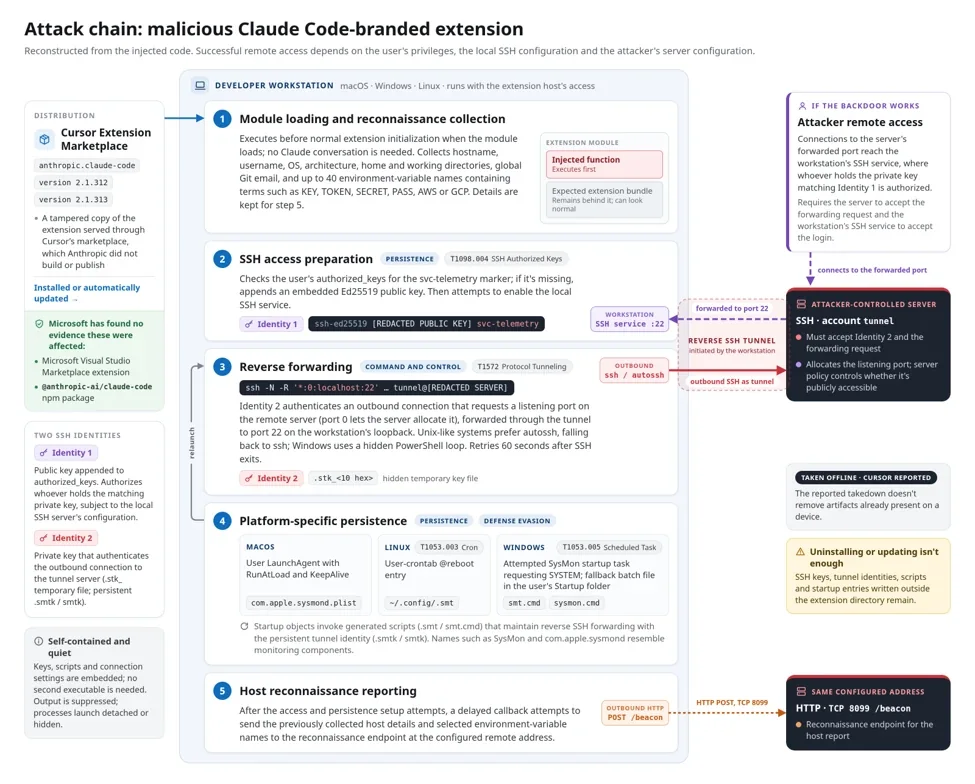
Microsoft found that the injected code runs when the extension loads, before the extension’s normal code, while the extension carries on working so nothing looks wrong. Cursor and Microsoft describe the same steps:
- Host details. It collected the hostname, username, operating system, architecture, home directory, working directory, Git email and public IP address. It also looked for up to 40 environment variable names containing strings such as KEY, TOKEN, SECRET, PASS, AWS or GCP. Microsoft says it sent the names, not the values.
- An attacker SSH key. It appended a public key with the comment
svc-telemetryto the user’sauthorized_keysfile. - A reverse tunnel. It tried to turn on the local SSH service and open an outbound SSH tunnel to 134[.]209[.]82[.]225, so the attacker could reach the machine’s SSH port from outside.
- Persistence. A LaunchAgent labelled
com.apple.sysmondon macOS, a user crontab@rebootentry on Linux, and on Windows a scheduled task calledSysMonthat tries to run as SYSTEM, with asysmon.cmdfile in the Startup folder as a fallback. The scripts retry the tunnel about every 60 seconds.
Here is how far it got, according to Cursor. Turning on the SSH service needs administrator rights, which the extension didn’t have on most macOS and Windows machines, and errors in the malicious code made the tunnel step fail unless Cursor had been started with admin rights. On those machines the attacker could not have logged in through the tunnel. But Cursor is clear that the extension did add the key, install persistence and send host details. The attacker’s server no longer works, yet Microsoft points out that the takedown doesn’t remove anything already written to a machine.
Step 1: check for the attacker key
These are Cursor’s commands, copied exactly from its notice. On macOS, open Terminal and run:
grep -qs svc-telemetry ~/.ssh/authorized_keys && echo "svc-telemetry key found" || echo "No key found; machine not impacted"On Windows, run this in PowerShell:
$files = "$HOME\.ssh\authorized_keys", "C:\ProgramData\ssh\administrators_authorized_keys" | Where-Object { Test-Path $_ }
if ($files -and (Select-String svc-telemetry $files)) { "svc-telemetry key found" } else { "No key found; machine not impacted" }
If you see “No key found; machine not impacted”, Cursor considers the machine not impacted. If you see “svc-telemetry key found”, it is. For organisations, Microsoft adds a caution: a missing marker on its own shouldn’t replace a review of install records, processes, network traffic and persistence. To confirm the key really is the attacker’s, compare its fingerprint with the one both companies publish: SHA256:0Z6R+DF64Do2nwQic8a7kkfDLNNk4IiK+2U2Rci4htk. We generated the fingerprint from the public key in Cursor’s notice and it matches.
Step 2: look for a tampered copy still on disk
You might think checking the extension’s version number in Cursor would settle it. It doesn’t. Cursor’s own clean-up script carries the comment “The tampered bundle keeps the real version number, so match on content”. So the scripts look inside each installed Claude Code extension for the svc-telemetry marker, and Cursor’s indicator list says the modified extension.js contains it. These two commands do the same search without changing anything. They are our adaptation of the search in Cursor’s scripts, not commands Cursor publishes.
On macOS or Linux, in Terminal:
find ~ -maxdepth 4 -path "*/extensions/anthropic.claude-code-*/extension.js" -exec grep -l svc-telemetry {} +On Windows, in PowerShell:
Get-ChildItem "$HOME\.*\extensions\anthropic.claude-code-*\extension.js" -Force -ErrorAction SilentlyContinue | Where-Object { Select-String -LiteralPath $_.FullName -Pattern svc-telemetry -SimpleMatch -Quiet } | ForEach-Object FullNameEach prints the path of any tampered extension file it finds and nothing otherwise. Like Cursor’s scripts, they search the extension folders of every VS Code-based editor in your home folder. No output only means no tampered copy is on disk now. It says nothing about files the payload already wrote elsewhere, so Step 1 remains the test that counts.
Optional: a Linux check built from the published indicators
Cursor lists affected packages for macOS and Windows only and publishes no Linux check. Microsoft’s analysis and Cursor’s indicator list do describe what the code does on Linux: the svc-telemetry key in ~/.ssh/authorized_keys, a crontab @reboot entry that runs ~/.config/.smt, the files ~/.config/.smt and ~/.config/.smtk, and a temporary key file /tmp/.stk_ followed by 10 hex characters. If you ran Cursor on Linux that day and want to rule this out, these lines look for exactly those indicators. We wrote them from the published lists; they are not an official check.
grep -qs svc-telemetry ~/.ssh/authorized_keys && echo "svc-telemetry key found" || echo "No svc-telemetry key"
crontab -l 2>/dev/null | grep -F ".config/.smt"
ls -la ~/.config/.smt ~/.config/.smtk /tmp/.stk_* 2>/dev/null
pgrep -af '\.stk_[0-9a-f]{10}|\.config/\.smt'
The first line should print “No svc-telemetry key”. Any output at all from the other three lines is a finding to investigate: a crontab entry, a file, or a running tunnel process.
Step 3: if the key is found
Cursor’s notice lists five steps. For an affected machine, the last three apply, together with the clean-up script for your platform:
- Isolate the machine if it shows signs the payload ran or the backdoor was installed.
- Remove the unauthorised SSH key, the persistence and any running tunnel processes, and decide whether to rebuild the machine. Cursor warns that “Uninstalling the extension may not be sufficient”, because the payload drops standalone scripts that keep running.
- Rotate credentials and sessions that were reachable from the machine, and do it from a different, trusted system. Cursor adds that the limited collection of variable names “does not rule out later credential access over the backdoor”.
Cursor’s scripts remove the tampered extension, the persistence, the tunnel processes and the attacker key, and exit with an error if anything is left. Download them only from Cursor’s notice, linked in the sources below. On macOS, run the script as the affected user, not as root, from the folder you saved it to:
bash remediate-macos.shOn Windows, open PowerShell with Run as Administrator, go to the folder you saved the script to, and run:
powershell -ExecutionPolicy Bypass -File .\remediate-windows.ps1Microsoft’s manual clean-up steps, for use after evidence has been collected:
- macOS: unload and remove the LaunchAgent at
~/Library/LaunchAgents/com.apple.sysmond.plist, then remove~/.config/.smtand~/.config/.smtk. - Linux: remove the crontab
@rebootentry that references~/.config/.smt, keeping your other entries, then remove the script and~/.config/.smtk. - Windows: remove the
SysMonscheduled task, thesysmon.cmdfile in the Startup folder, and%USERPROFILE%\.config\smt.cmdand%USERPROFILE%\.config\smtk. - All platforms: stop the malicious SSH and retry processes and delete their temporary
.stk_key files.
Microsoft also advises checking what each startup entry actually runs before you delete it, because names like SysMon can belong to real monitoring software. If you’re unsure about your situation, Cursor asks you to contact [email protected].
Indicators of compromise
The main indicators from Cursor’s updated list, with addresses left defanged as Cursor prints them. Cursor’s notice also lists the hashes of the four modified VSIX packages.
| Type | Indicator |
|---|---|
| Attacker IP | 134[.]209[.]82[.]225 (reverse SSH on TCP 22, HTTP beacon on port 8099) |
| SSH key comment | svc-telemetry |
| Key fingerprint | SHA256:0Z6R+DF64Do2nwQic8a7kkfDLNNk4IiK+2U2Rci4htk |
| Payload (extension.js) SHA-256 | ecb58cb29078d9646ad1dcdbe51526f2d9cfea06be5fb2ab183e8ecc3ab6bf15 |
| macOS files | ~/.config/.smt, ~/.config/.smtk, $TMPDIR/.stk_<10 hex>, ~/Library/LaunchAgents/com.apple.sysmond.plist |
| Linux files | ~/.config/.smt, ~/.config/.smtk, /tmp/.stk_<10 hex>, cron @reboot /bin/sh "<HOME>/.config/.smt" |
| Windows files | %USERPROFILE%\.config\smt.cmd, %USERPROFILE%\.config\smtk, %TEMP%\.stk_<10 hex>, %APPDATA%\Microsoft\Windows\Start Menu\Programs\Startup\sysmon.cmd |
| Windows task | SysMon (attempts to run as SYSTEM) |
Cursor notes that lookups to ifconfig.me or api.ipify.org on their own are not an indicator, because those are legitimate services the payload used to find the public IP.
How to lower the risk next time
Microsoft recommends two controls from Cursor’s security-hardening guide, and Cursor’s extension docs explain where to set them:
- An install cooldown. Cursor can hold back extension installs and updates until a version has been public for a set number of hours, which blunts short-lived malicious uploads like this one. Team owners and admins set it under Team settings → Security & automation → Marketplace Install Cooldown (hours); the default is 0, meaning off. Individual users can set
extensions.installCooldownHoursin their own settings if their team hasn’t enforced one. - Allowed extensions. Teams can restrict installs to approved publishers or extension IDs in the team dashboard or through MDM.
- Signature verification. Enterprise teams can also require valid Open VSX extension signatures before an install.
Cursor’s docs say these client-side controls add to its marketplace scanning rather than replace it. If you’re deciding how to run Claude Code in the first place, our Cursor vs Claude Code comparison covers the editor and terminal set-ups, and Codex vs Claude Code compares it with OpenAI’s agent.
Most people who use Claude Code were never exposed: the CLI and the VS Code Marketplace build were clean, and the bad versions were live in one marketplace for one working day. If you use Claude Code inside Cursor, don’t rely on that. Run Cursor’s one-line check, and if it finds the key, treat the machine as compromised even though the tunnel probably failed. The key and the startup scripts were still written, and they stay until you remove them. For teams, a few hours of install cooldown is a cheap setting that would have kept this release off machines that waited.
Frequently asked questions
I use the Claude Code CLI, not an editor extension. Am I affected?
No. Microsoft says the malicious packages were never published or distributed through npm under @anthropic-ai/claude-code. The incident was limited to Cursor’s extension marketplace.
I use Claude Code in VS Code. Am I affected?
Not through the Visual Studio Marketplace. Microsoft confirmed the tampered packages were never published or distributed there.
Which versions were malicious?
Anthropic.claude-code 2.1.312 and 2.1.313 as served by Cursor’s marketplace on 29 October 2026, between about 2:27am and 1:35pm Pacific time. The tampered copies carry the real version numbers, so the version alone doesn’t prove a copy is tampered.
Is uninstalling the extension enough?
No. The payload writes an SSH key, scripts and startup entries outside the extension folder. Cursor says uninstalling may not be sufficient; use its check and, if needed, its clean-up script.
Were my passwords or API keys stolen?
The extension sent the names of up to 40 environment variables, not their values, according to Microsoft. Cursor still tells affected users to rotate credentials from a trusted system, because the backdoor key could allow access later.
Did Anthropic make the malicious version?
No. Cursor says the versions were not developed by Anthropic, Microsoft says Anthropic confirmed its systems were not compromised, and an Anthropic staff member said a malicious actor used access to Cursor’s marketplace.
Sources and method
We read Cursor’s security notice in its 30 October version, Microsoft’s analysis, Cursor’s two remediation scripts and Cursor’s extension and security-hardening docs on 3 November 2026. All check and clean-up commands credited to Cursor are copied verbatim from its notice. The extension-folder search and the Linux check are our own, built from the paths and indicators in those sources, and we marked them as such. We confirmed the published key fingerprint by generating it from the public key in Cursor’s notice. The time-zone conversions are our calculation. We did not have an affected machine and didn’t run the malicious code.
- Cursor, Security notice: malicious version of Anthropic.claude-code (2.1.312 and 2.1.313) identified in the Cursor VS Code Extension Marketplace (29 October 2026, updated 30 October 2026)
- Microsoft Security Blog, Inside a malicious Claude Code-branded extension and its persistent SSH backdoor (30 October 2026)
- Cursor, remediate-macos.sh and remediate-windows.ps1 (linked from the notice, read 3 November 2026)
- Cursor Docs, Extensions (install cooldown, allowed extensions, signature verification)
- Cursor Docs, Security hardening
- The Register, Anthropic: That Claude Code extension compromise… couldn’t be us (30 October 2026, Anthropic’s statement on X)