
Research covers several jobs, and an AI tool that’s good at one is often poor at the next. A search engine that answers in ten seconds with three links won’t write you a literature review. So we sorted nine tools by the job each does best: quick answers with sources, long research reports, academic papers, your own documents and private search. Plans, free limits and what each tool cites were checked on the vendors’ own pages on 30 September 2026.
- Quick answers with sources: Perplexity. Every answer carries inline citations, and basic searches are free. Google AI Mode does a similar job, free, inside Google Search.
- Long research reports: Gemini Deep Research, which is free. If you already pay for ChatGPT Plus or Claude Pro, use the research mode you have.
- Academic papers: Consensus for quick, cited answers from the literature. Elicit once the work turns into a systematic review.
- Your own documents: Gemini Notebook, formerly NotebookLM. It answers only from the files you add.
- Private search: Kagi. Its Assistant never trains on your data, and plans start at $5 a month.
The nine tools side by side
Prices are US list prices for individual plans, taken from each vendor’s own pages on 30 September 2026. The last column shows where a tool gets its sources, which matters more for research than which model sits underneath.
| Tool | Best for | Free plan | Paid from | Where sources come from |
|---|---|---|---|---|
 Perplexityperplexity.ai | Quick answers | 3 Pro Searches a day | $20 / month | Web, inline citations |
 Google AI Modein Google Search | Quick answers | Yes | $19.99 (AI Pro) | Links to web pages |
 Gemini Deep ResearchGemini app | Long reports | Yes, daily limit | $4.99 (AI Plus) | Google Search, Gmail, Drive, files |
 ChatGPT deep researchChat and Work | Long reports | Not stated | $20 (Plus) | Web, files, connected apps |
 Claude Researchclaude.ai | Long reports | No | $20 (Pro) | Web, Gmail, Calendar, Docs |
 Consensusconsensus.app | Academic papers | 3 Deep reviews a month | $20 / month | Peer-reviewed papers |
 Elicitelicit.com | Systematic reviews | Unlimited paper search | $11 (Plus, yearly) | Academic papers |
 Gemini Notebookformerly NotebookLM | Your own documents | 50 sources per notebook | $4.99 (AI Plus) | Only the files you add |
 Kagi Assistantkagi.com | Private search | Trial only | $5 (Starter) | Kagi Search results |
How we chose
We went through each candidate’s plan page, help centre and release notes on 30 September 2026. A tool made the list if the vendor documents where its sources come from, and if we could see its free limits and prices without signing in. Where OpenAI’s and Perplexity’s help pages blocked us, we read the Internet Archive’s September copies. We haven’t run a scored accuracy test for this guide, so anything below about quality is the vendor’s claim.
The best AI search engines for quick answers
For a question with a factual answer, you want an AI search engine: one that searches the web, writes a short answer and shows you where each claim came from, so you can click through and check. Two are worth your time.
Perplexity
Perplexity is still the one we’d start with. Its pricing page promises “citations in every answer”, and they sit inline, next to each claim. The free plan gives you what Perplexity calls “practically unlimited basic searches”, but its help centre in late September listed only three Pro Searches a day and one Research query a month. Pro, at $20 a month, moves those to weekly and monthly allowances, lets you pick a preferred model per query and adds premium data sources such as PitchBook and Statista. Max costs $200 a month. Perplexity also makes our list of ChatGPT alternatives, where we look at it as an everyday assistant.
Google AI Mode
AI Mode is the tab in Google Search that answers in full sentences. Google says it splits your question into subtopics, searches for each at once and writes a response with links to explore further. It’s free. Subscribers to Google AI Pro ($19.99 a month) or Ultra who are 18 or older can switch to Google’s strongest model, Gemini 4 Argon, which has daily limits and is offered only in some countries. When it isn’t confident, Google says, AI Mode may show a set of links instead of an answer.
Long deep-research reports
Deep research modes are agents. You describe the question, the tool drafts a plan, and then it spends several minutes searching, reading and writing a structured report with its sources. Three of the big assistants have one, and which one you use mostly comes down to what you already pay for.
Gemini Deep Research
Gemini’s is the one you can use for free. Google’s plan page lists Deep Research on the free tier, and its help page says a report usually takes five to ten minutes. Google Search is the default source. You can add Gmail, Drive, uploaded files and notebooks from Gemini Notebook, or untick Search to research only your own material. You can edit the plan before it runs and export the finished report to Google Docs. Limits are counted per day and Google doesn’t publish the number. At busy times Deep Research may be unavailable to free users. AI Plus at $4.99 a month doubles the usage allowance. AI Pro at $19.99 quadruples it and lets you write reports with the Pro model.
ChatGPT deep research
OpenAI’s version gives you the most control over sources. In ordinary Chat it proposes a research plan you can edit, and a Sites setting lets you restrict the search to domains you name or simply put them first. It can read files you upload and, depending on your plan and region, connected apps such as Google Drive or SharePoint. In Chat it only reads from those apps and never writes to them. Reports list the sources used and can be downloaded as Markdown, Word or PDF. ChatGPT now runs deep research in two places. In Chat it has its own task allowance, which OpenAI’s help page says “varies by plan” without giving numbers; in Work it draws on your Work and Codex allowance instead. Plus is $20 a month and Pro starts at $100.
Claude Research
Anthropic keeps Research for paying customers on Pro, Max, Team and Enterprise. Pro costs $20 a month, or $17 a month on an annual plan. With web search switched on, Claude runs “multiple searches that build on each other” and returns an answer “complete with easy-to-check citations”. If you’ve connected Gmail, Google Calendar or Google Docs, it searches those too. There’s no separate research allowance. Anthropic says Research counts against your normal usage limits but can use them up faster. We set the two apps against each other in Claude vs ChatGPT.
If you’re weighing up Claude Pro, ChatGPT Plus and Google AI Pro anyway, the research mode is a small part of the decision. All three plans cost about $20 and all three write a sourced report. Try Gemini’s free version first, and pay only when you run into the daily limit.
Academic papers
General assistants search the open web, which is full of press releases and blog posts about studies. For coursework, a thesis or a clinical question you want a tool that searches the papers themselves. These two suit different stages of the work.
Consensus
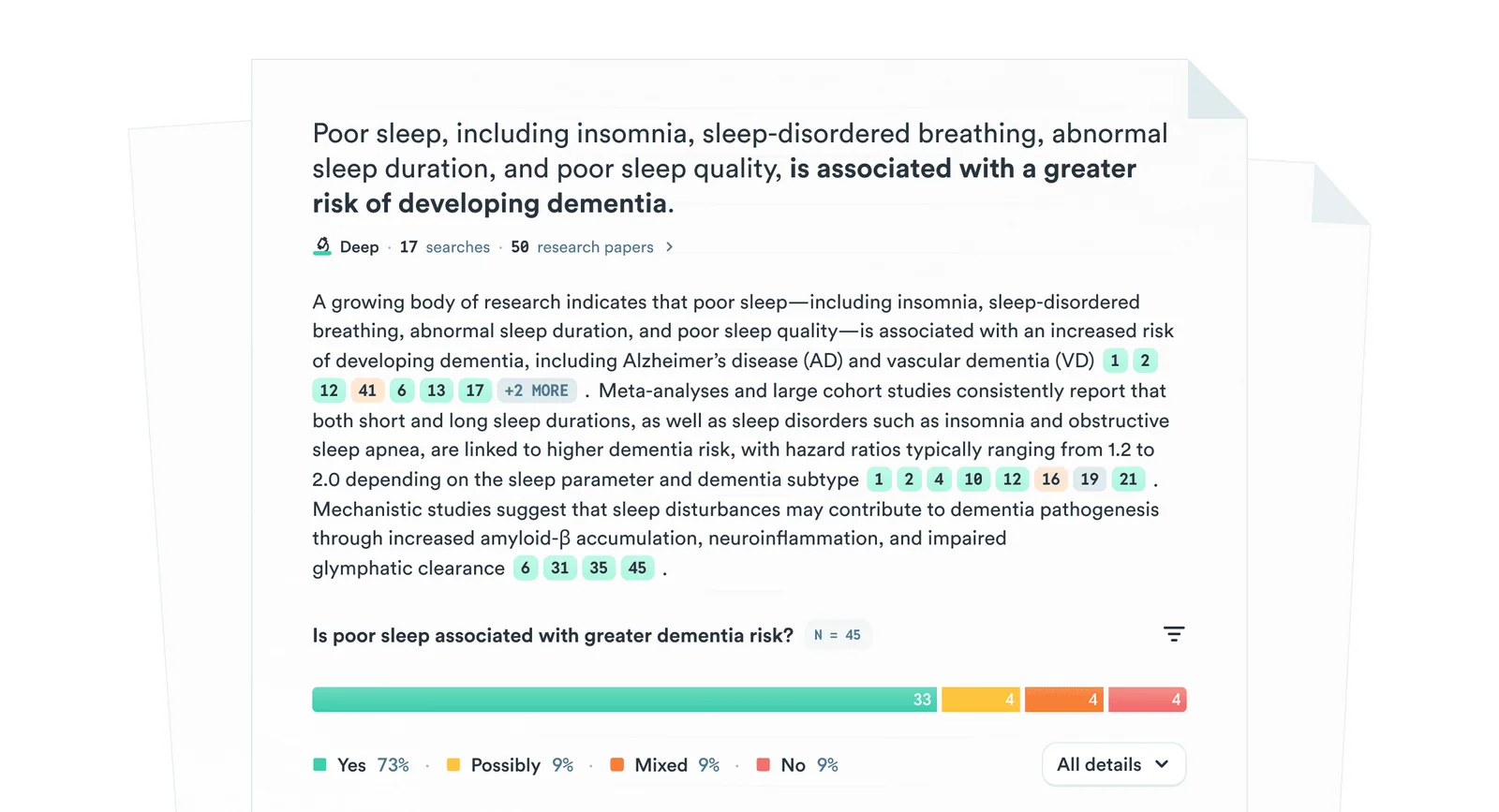
Consensus is the quicker of the two. Its documentation says it searches 400 million peer-reviewed papers and ranks results by research quality before it writes an answer. A Deep search goes further. It runs up to 20 searches in parallel, follows citation links out from the strongest results and reads 50 to 100 papers before it answers, with an inline citation on every statement. You can copy answers out with references in APA, MLA, Harvard and other styles. The free plan includes unlimited paper searches, 10 Pro messages, 3 Deep reviews and 10 Study Snapshots a month. Pro is $20 a month or $144 a year, with unlimited Pro messages and 15 Deep reviews. The Deep plan, at $65 a month, raises that to 200.
Elicit
Elicit is built for the slower, more formal end of the job, such as pulling data from dozens of papers into a table or screening them for a systematic review. The free Basic plan gives you unlimited search across more than 138 million papers, unlimited summaries and chat with papers, plus limited use of its Research Agent and Reports. Elicit now measures usage as one monthly pool shared across features, so a long report uses more of it than a quick question. Plus is listed from $11 per user a month billed annually ($132 a year) and adds export to RIS, BIB and CSV for your reference manager. Pro, from $39 a month billed annually, adds a systematic review workflow that can screen 5,000 papers.
One tip for students. If your university runs coursework through an AI detector, keep your notes and drafts, because those tools can flag human writing too.
+Reasons to use a paper search tool
- Answers come from journals rather than blogs and press releases
- Each citation points to a study you can add to a reference manager
- Filters for year, journal quality and citation counts
- Built for literature reviews and data extraction
+Reasons to use a general assistant
- Covers news, company pages and official data outside journals
- Gemini writes full research reports on its free plan
- One subscription for writing and research
- Can search your email and files when you connect them
Working with your own documents
Gemini Notebook (formerly NotebookLM)
When the sources are yours, such as interview transcripts, a folder of PDFs or last year’s reports, you want a tool that answers from them and nothing else. Google’s Gemini Notebook, called NotebookLM until Google renamed it on 16 July 2026, is still the one to use. You add PDFs, websites, YouTube videos, audio files, Google Docs or Slides, and it answers “based on your sources with clear in-line citations”. The free plan holds 100 notebooks of up to 50 sources each. AI Plus at $4.99 raises that to 100 sources a notebook and AI Pro at $19.99 to 300. Since 2 September Google has been moving personal accounts to compute-based limits that refresh every five hours. Google says your data “is not used to train Gemini Notebook unless you provide feedback”.
Private search
Kagi Assistant
Some of the tools above can use what you type to improve their models unless you switch it off. If that bothers you, Kagi is the one we’d pick. It’s a paid, ad-free search engine, and its Assistant sends your question to a model you choose, with Kagi Search results added if you want them. Kagi’s documentation says “your data is never used to train AI models (not by us or by the LLM providers)”, and that threads are deleted after 24 hours of inactivity unless you change the setting. The trial gives you 100 searches and 100 Assistant interactions. Starter is $5 a month for 300 searches and the Assistant in Quick mode, Professional is $10 for unlimited searches, and Ultimate at $25 adds Research mode and the flagship models. On every plan the Assistant is subject to a fair use policy; Kagi says a $25 plan buys up to $25 of model usage.
Verdict
If you try only two things, make them Perplexity’s free plan for everyday questions and Gemini Deep Research for anything that needs a proper report. Both are free and cover most research needs. Students and anyone reading the scientific literature should add Consensus, whose free plan is enough to tell whether it suits you, and move to Elicit when the work becomes a systematic review. Put your own files in Gemini Notebook.
Pay only when you hit a limit. If you already have ChatGPT Plus or Claude Pro, use their research modes before you buy anything else. If privacy matters most, Kagi Professional at $10 covers private search, and Ultimate at $25 adds Research mode.
Frequently asked questions
What is the best AI for research?
It depends on the job. Perplexity is best for quick answers with sources, Gemini Deep Research for long reports on a free plan, Consensus and Elicit for academic papers, and Gemini Notebook for questions about your own documents. If you already pay for ChatGPT Plus or Claude Pro, their research modes are included.
What is the best AI search engine?
Perplexity, for most people. It puts inline citations on every answer and its free plan covers practically unlimited basic searches. Google AI Mode is the free alternative inside Google Search, and Kagi is the paid option if you want no ads and no training on your data.
Is there a free AI for deep research?
Yes. Gemini Deep Research is on Google’s free plan, with a daily limit Google doesn’t publish. Perplexity’s free plan includes one Research query a month and Consensus’s free plan three Deep reviews a month. Claude’s Research needs a paid plan, from $20 a month.
Can AI find real academic papers?
Yes, if you use a tool that searches papers directly. Consensus says it covers 400 million peer-reviewed papers and Elicit more than 138 million, and both link each answer to the studies behind it. General chatbots search the open web, so check that every paper they cite exists and says what the summary claims.
What happened to NotebookLM?
Google renamed it Gemini Notebook on 16 July 2026. It’s the same standalone product. Your notebooks now sync with the Gemini app, and Gemini Deep Research can use them as a source. The free plan still holds 100 notebooks of up to 50 sources each.
Sources and method
Plans, prices, free limits and source types were taken from the vendors’ own pages on 30 September 2026. OpenAI’s and Perplexity’s help centres blocked automated access that day, so we used the Internet Archive’s copies of the same official pages (OpenAI, 14 September 2026; Perplexity, 22 and 29 September 2026) together with OpenAI’s live ChatGPT documentation and Perplexity’s Apple App Store listing. Paper counts and quality claims are the vendors’ own. We haven’t run a scored accuracy test of these tools for this guide.
- Perplexity, Pricing (Free, Pro and Max features, citations, premium data sources)
- Perplexity Help Center, Which subscription plan is right for you? (free limits, Education Pro) and the App Store listing ($20 Pro, $200 Max)
- Google Search Help, AI Mode (query fan-out, links, Gemini 4 Argon access and limits, data use)
- Google, Gemini subscriptions (Free, AI Plus, AI Pro prices and features, Deep Search in AI Mode)
- Gemini Apps Help, Use Deep Research, Limits and upgrades and Deep Research overview (sources, timing, daily limits, exports)
- OpenAI Help Center, Deep research in ChatGPT (sources, Sites, reports, usage, data controls), ChatGPT pricing documentation (Plus $20, Pro from $100) and the ChatGPT Plus plan page (deep research listed among Plus features; read through search results because the page blocked direct access)
- Claude Help Center, Use research on Claude and Claude pricing (plans with Research, $20 and $17 prices, usage)
- Consensus Help Center, Subscription plans, Deep Search documentation and Deep Search launch post (limits, prices, 400 million papers, citations, image)
- Elicit, Pricing and Usage limits in Elicit (free plan, Plus and Pro annual prices, usage pool)
- Google, NotebookLM is now Gemini Notebook, flexible usage limits, Upgrade Gemini Notebook and Learn about Gemini Notebook (rename date, source limits, citations, training)
- Kagi, Pricing and Kagi Assistant documentation (plans, trial, no-training statement, 24-hour threads)